

TL;DR:
- Modern, affordable CRM systems enable small businesses to automate workflows and increase productivity.
- A structured CRM workflow guides prospects through stages from lead capture to onboarding, improving customer experience.
- Building targeted, tested automations based on specific bottlenecks yields significant growth and efficiency.
Many small business owners assume CRM systems are built for enterprise sales teams with large budgets and dedicated IT staff. That assumption is costing them real growth. Modern, affordable CRM platforms put powerful workflow automation within reach of any small business, and the results speak for themselves. With 74% using AI reporting measurable productivity gains, this is no longer a “nice to have.” In this guide, you’ll learn exactly what a CRM workflow is, how each stage works, where automation makes the biggest difference, and how to build a system that grows with your business.
Key Takeaways
| Point | Details |
|---|---|
| Map your workflow first | Start by understanding and outlining every customer touchpoint before adding automation. |
| Automate high-impact steps | Begin automation with repetitive tasks like lead assignment and follow-ups for rapid wins. |
| Track and evolve | Review your CRM workflow regularly to reinforce what works and improve weak links for lasting growth. |
| AI can supercharge results | Integrating AI and LLMs with your workflow can boost productivity and drive measurable performance improvements. |
What is a small business CRM workflow?
A CRM workflow is a structured series of steps that defines how your business captures, manages, and converts leads into paying customers. Think of it as a repeatable playbook. Instead of relying on memory or sticky notes, your CRM guides every prospect through a clear process, so nothing falls through the cracks.
For small businesses, this structure is a game-changer. You’re not just organizing contacts. You’re creating a consistent experience that builds trust, speeds up sales, and frees up your time. Every team member knows what to do next, and every customer gets the attention they deserve.
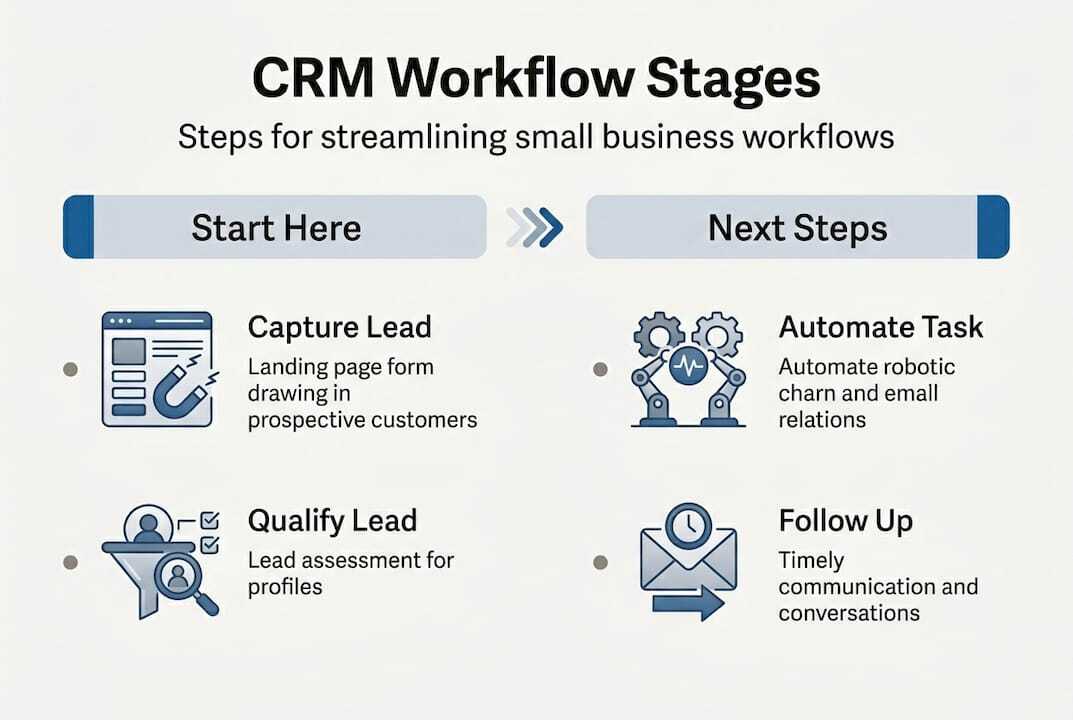
Typical CRM workflow stages for small businesses follow this logical progression:
| Stage | Purpose |
|---|---|
| Lead Capture | Collect contact info from forms, ads, or referrals |
| Qualification | Assess if the lead fits your ideal customer profile |
| Outreach | Make initial contact via email, SMS, or call |
| Follow-up | Nurture the lead with timely, relevant communication |
| Deal Tracking | Monitor progress through your sales pipeline |
| Conversion | Close the deal and collect payment or commitment |
| Post-sale Onboarding | Welcome new clients and set them up for success |
Here’s a quick look at what each stage accomplishes:
- Lead Capture: Pulls prospect information from landing pages, social ads, or contact forms into one centralized place.
- Qualification: Scores or filters leads based on budget, need, or fit, so you focus energy where it counts.
- Outreach: Initiates the first conversation through the most relevant channel for that prospect.
- Follow-up: Sends reminders and nurturing messages to keep prospects engaged without manual effort.
- Deal Tracking: Gives you a live view of every opportunity and where it stands in your pipeline.
- Conversion: Executes the final steps, from proposal to signed agreement, efficiently.
- Post-sale Onboarding: Sets expectations, delivers resources, and begins the relationship on a strong note.
Core workflow at a glance: Lead Capture → Qualification → Outreach → Follow-up → Deal Tracking → Conversion → Post-sale Onboarding. Each stage feeds the next, creating a smooth, predictable customer journey.
For a deeper walkthrough of setting these stages up in your system, the CRM workflow setup guide on our site is a practical starting point.
Breaking down the CRM workflow: Step-by-step guide
With the workflow stages defined, let’s walk through each one and show you how to bring it to life.
-
Map your lead sources first. Before you build anything in your CRM, list every place a prospect can find you. Website forms, Google ads, Facebook, referrals, and walk-ins all count. Connect each source to your CRM so leads land in one place automatically.
-
Set your qualification criteria. Decide what makes a lead worth pursuing. This could be industry, budget range, location, or a specific need. Your CRM can score leads based on these factors and flag the best ones for immediate follow-up.
-
Create your outreach templates. Write two or three email and SMS templates for that first contact. Keep them short, personal, and focused on one specific benefit. A good CRM lets you personalize these at scale using merge fields.
-
Define your follow-up sequence. Most leads need five or more touches before they respond. Map out a sequence, for example, Day 1 email, Day 3 SMS, Day 7 call reminder, and let your CRM trigger each step automatically.
-
Build your pipeline view. Set up columns or stages in your CRM that reflect your actual sales process. Drag and drop deals as they progress so you always know what needs attention.
-
Automate conversion tasks. Use your CRM to send proposals, collect e-signatures, or generate invoices without switching between tools.
-
Launch an onboarding workflow. The moment a deal is marked as won, trigger a welcome email sequence, schedule a kickoff call, and send any needed resources automatically.
The biggest mistake people make is skipping the planning phase and jumping straight to automation. As the principle goes, define workflow before automating to avoid broken processes. If your manual process is disorganized, automating it just makes the mess run faster.
The automation workflow guide offers more detail on sequencing these steps correctly.
Pro Tip: Before touching your CRM, sketch your workflow on paper or a whiteboard. Identify the two or three steps where leads most often go cold. Those are your highest-priority automation targets.
The power of automation: How CRM workflows drive results
Understanding the steps is critical, but bringing automation into your CRM workflow multiplies the impact. Let’s look at what changes when you automate.

First, the numbers. A microbusiness cut churn 25% by combining CRM workflows with an LLM (Large Language Model, meaning AI-powered text generation) for personalized follow-ups, dropping monthly churn from 3.2% to 2.4%. That’s not a minor tweak. That’s a structural improvement in how a business retains customers.
Manual vs. automated CRM workflow:
| Factor | Manual workflow | Automated workflow |
|---|---|---|
| Follow-up speed | Hours to days | Seconds to minutes |
| Consistency | Depends on team | Always-on, never skips |
| Personalization | Generic | Data-driven, tailored |
| Time investment | High | Low after setup |
| Scalability | Limited by headcount | Scales with lead volume |
Automation handles the tasks that eat up your day but don’t require your personal judgment. Here’s what you can put on autopilot:
- Lead assignment to the right team member based on territory or service type
- Instant acknowledgment emails when someone fills out a form
- Appointment reminders via SMS or email to cut no-shows
- Re-engagement messages for leads that went quiet
- Post-sale check-ins to encourage reviews and referrals
When AI is layered into your workflow, the personalization level jumps significantly. Instead of sending everyone the same follow-up, your CRM can generate messages that reference what the prospect actually inquired about, making every touchpoint feel intentional.
Understanding CRM for SMBs helps clarify how these tools are designed to work for your scale, not just for enterprise teams. If you’re still wondering why use a CRM at all, the short answer is simple: consistency and speed at a cost that makes sense.
Building and optimizing your CRM workflow: Practical steps
You’ve seen the value of automation. Here’s how to build a CRM workflow that delivers real ROI.
-
Audit your current process. Write down every step your team takes from first contact to closed deal. Include all the tools you currently use and where handoffs happen.
-
Choose one workflow to start. Don’t try to automate everything on day one. Pick the workflow that has the highest volume or the most repetitive steps. Lead follow-up is usually the best place to begin.
-
Configure your CRM triggers. A trigger is the event that kicks off a workflow, like a form submission or a deal moving to a new pipeline stage. Set up triggers for your chosen workflow and attach the right automated actions.
-
Test before going live. Run yourself or a team member through the workflow as if you were a new lead. Check every email, every delay, and every action for accuracy.
-
Measure results after 30 days. Track metrics like response time, conversion rate, and time saved per week. Use these numbers to identify where the workflow can improve.
-
Iterate and expand. Once your first workflow is running smoothly, build the next one. Each iteration should be informed by data, not guesswork.
The results from doing this well are significant. Papeloja grew revenue 800% using Keap CRM by organizing their data and systematically automating their core workflows. They didn’t overhaul everything overnight. They started with organization, added automation, and scaled from there.
For practical help refining your setup, the guide on how to optimize marketing automation covers the testing and iteration phase in detail. You can also explore the steps to automate marketing workflows to see how these systems connect.
Pro Tip: Set a 30-day review date the moment you launch any new workflow. Without a scheduled checkpoint, most small business owners forget to measure, and miss easy wins hiding in the data.
A smarter path: What most small businesses get wrong about CRM workflows
Here’s an opinion that might challenge what you’ve been reading elsewhere: most small businesses don’t fail with CRM because they picked the wrong software. They fail because they skip the thinking and go straight to the clicking.
The temptation is real. CRM platforms today are impressive, and it’s easy to start layering on features before you’ve mapped a single high-impact step. But automation built on top of a vague or broken process just produces broken results faster.
The businesses that get smarter CRM growth aren’t the ones with the most automations running. They’re the ones who identified their two or three most costly manual bottlenecks, fixed those first, and measured the outcome before moving on. Feedback loops beat feature lists every time.
Start simple. Build trust in your process before you scale it. Your CRM is only as smart as the workflow behind it.
Ready to streamline your CRM workflow?
If this guide gave you clarity, the next step is putting it into practice with tools designed for your scale and budget. Go Online Now-Connect is built specifically for small business owners who want results without the complexity or the inflated price tag.
Our marketing automation for SMBs platform combines CRM, automation, and done-for-you setup in one affordable system. Whether you’re starting from scratch or fixing a broken process, our team configures your workflows at no extra cost. Explore the CRM workflow setup guide to see exactly how to get started, or visit our CRM for SMBs page to learn what the platform can do for your business today.
Frequently asked questions
What is the main advantage of a CRM workflow for a small business?
A CRM workflow helps small businesses efficiently manage leads, improve customer follow-up, and boost sales with less manual effort. By following structured workflow stages from lead capture to post-sale onboarding, every prospect receives consistent, timely attention.
How does CRM workflow automation save time?
Automation handles repetitive tasks like lead assignment and follow-up, allowing your team to focus on high-value work and respond faster. Businesses using AI-enhanced workflows see measurable productivity gains within the first 90 days of implementation.
How do I start building a CRM workflow?
Begin by mapping your key customer touchpoints, then prioritize automating the steps that save the most time or prevent leads from going cold. The principle is clear: define workflow before automating so you’re building on a solid foundation, not speeding up a broken one.
Can CRM workflows help increase revenue?
Absolutely. Small businesses using CRM workflows report higher conversions and measurable revenue growth. As one example shows, Papeloja grew revenue 800% by systematically organizing their data and automating core workflows with Keap CRM.