

TL;DR:
- Connecting marketing platforms with CRM systems enables SMBs to unify customer data and improve personalization.
- Integration accelerates lead follow-up, enhances data accuracy, and streamlines sales and marketing workflows.
- Starting with small pilot projects and choosing compatible tools helps SMBs avoid common integration pitfalls.
Most small and mid-sized businesses run their marketing tools and CRM (customer relationship management) software as separate systems. Email campaigns go out from one platform, while customer data lives somewhere else entirely. The result? Missed follow-ups, duplicate records, and a fragmented view of your customers. When you connect these two systems, something powerful happens. Your marketing becomes smarter, your sales process gets faster, and your team stops wasting time on manual data entry. This article breaks down what marketing and CRM integration really means, why it matters for SMBs, and how you can use it to grow faster without adding complexity.
Key Takeaways
| Point | Details |
|---|---|
| Unified customer insights | Integrating marketing and CRM gives SMBs a single view of each customer for better targeting. |
| More effective lead nurturing | Personalized and timely engagement becomes automated, increasing conversion rates. |
| Streamlined operations | Automation reduces manual work, human error, and lost opportunities in sales and marketing. |
| Affordable scalability | Integrated solutions now fit SMB budgets, making them accessible for growth-focused owners. |
What is marketing and CRM integration?
Integration, in this context, means connecting your marketing platforms (think email campaigns, SMS, landing pages, and ad tools) with your CRM system so they share data automatically. Instead of exporting a list from your CRM and importing it into your email tool every week, the two systems talk to each other in real time.
Many SMBs currently juggle separate tools like these:
- An email marketing platform (e.g., Mailchimp or ActiveCampaign)
- A standalone CRM (e.g., Zoho or Pipedrive)
- A separate form or landing page builder
- A manual spreadsheet for tracking leads
The headaches are real. You update a contact in your CRM, but your email list still has the old information. A lead fills out your form, but no one follows up because the notification got buried. Data gets duplicated, errors creep in, and your team spends hours on tasks that should take minutes.
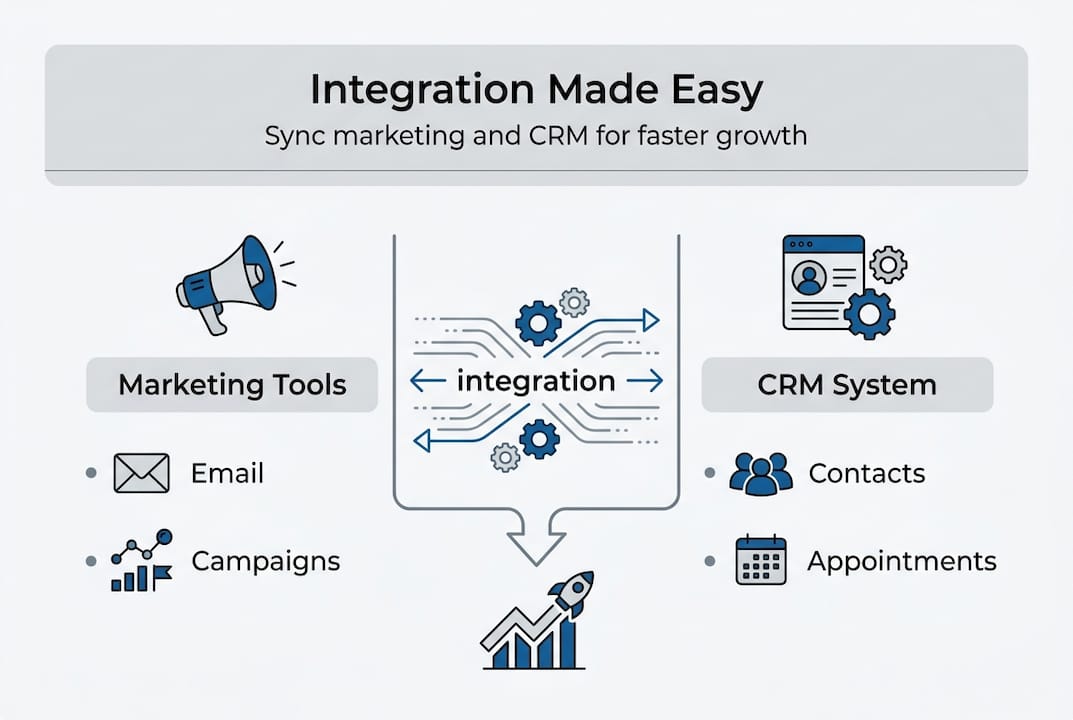
Integration solves this by creating a single source of truth. Every interaction, from a clicked email to a booked appointment, flows into one unified system. As research confirms, unified customer profiles enable personalized experiences and improved lead nurturing for SMBs.
When you explore combining CRM and marketing automation, you quickly realize it is not just a technical upgrade. It is a fundamental shift in how your business manages relationships and drives revenue. The tools stop working against each other and start working together.
Key benefits for small and mid-sized businesses
After clarifying what integration is, it is vital to see the core benefits it brings to small and mid-sized businesses.
| Metric | Siloed approach | Integrated approach |
|---|---|---|
| Lead follow-up time | Hours or days | Minutes (automated) |
| Data accuracy | Prone to errors | Consistently updated |
| Marketing personalization | Generic messages | Behavior-based targeting |
| Team efficiency | High manual workload | Streamlined and automated |
| Customer retention | Reactive | Proactive and data-driven |
The table above tells a clear story. Siloed tools create friction at every stage of the customer journey. Integration removes that friction.
Here are the main benefits SMBs gain when they connect their marketing and CRM tools:
- Unified customer data: Every interaction is logged in one place, giving your team a complete picture of each contact.
- Personalized marketing: You can send the right message to the right person at the right time, based on actual behavior.
- Improved lead nurturing: Automated sequences keep leads engaged without requiring manual effort from your team.
- Streamlined follow-up: Sales reps get notified instantly when a lead takes action, so nothing slips through the cracks.
- Better ROI tracking: You can see exactly which campaigns drive revenue, not just clicks.
Pro Tip: Automation reduces manual data entry by a significant margin. Fewer manual steps mean fewer mistakes and faster follow-up, which directly impacts your conversion rates. Explore marketing automation use cases to see how other SMBs are applying this in practice.
The marketing automation impact on SMB growth is well documented. When your systems share data, every campaign becomes more targeted and every sales conversation becomes more informed.

How integration streamlines sales and marketing processes
Knowing the benefits, let’s see how real integration works inside your sales and marketing processes.
| Process | Before integration | After integration |
|---|---|---|
| Average follow-up time | 24 to 48 hours | Under 5 minutes |
| Manual data entry hours per week | 5 to 10 hours | Less than 1 hour |
| Lead-to-customer conversion rate | Lower, inconsistent | Higher, predictable |
| Reporting accuracy | Fragmented, manual | Automated, real-time |
The numbers speak for themselves. Integration compresses timelines and removes the bottlenecks that cost you deals.
Here is how an integrated workflow typically operates:
- Lead capture: A visitor fills out a form on your website. The lead is automatically added to your CRM with their source, interests, and contact details.
- Instant notification: Your sales rep receives an alert and can reach out within minutes while the lead is still engaged.
- Automated nurturing: If the rep does not connect immediately, a pre-built email or SMS sequence keeps the lead warm automatically.
- Pipeline tracking: Every interaction updates the lead’s status in the CRM, so your team always knows where each prospect stands.
- Reporting: At the end of the week, your dashboard shows exactly how many leads came in, how many converted, and which campaigns drove results.
Pro Tip: Use triggers to automate routine tasks. For example, when a lead opens an email three times without responding, trigger a task for your sales rep to call them. This kind of small business workflow automation reduces missed opportunities significantly.
Research confirms that unified customer profiles enable improved lead nurturing, and the workflow above is exactly how that plays out in practice. For a deeper look at how this affects your bottom line, see how CRM boosting SMB sales translates to real revenue gains.
Personalized customer experiences that drive growth
Process efficiency sets the foundation. The real opportunity lies in personalization driving real growth.
“Integration of marketing and CRM provides SMBs with a unified customer view, enabling personalized experiences and improved lead nurturing.”
Personalization is not about using someone’s first name in an email subject line. It is about sending the right content to the right person based on what they have actually done. Here are practical ways SMBs can personalize their marketing using integrated tools:
- Segmentation: Group contacts by industry, purchase history, location, or engagement level and tailor your messaging accordingly.
- Behavior-based triggers: Send a follow-up email automatically when someone visits your pricing page or watches a product video.
- Dynamic content: Show different content blocks in the same email based on what a contact has previously purchased or expressed interest in.
- Re-engagement campaigns: Identify contacts who have gone quiet and send a targeted sequence to win them back before they leave for good.
When your marketing speaks directly to a customer’s situation, engagement goes up. Higher engagement leads to more conversions, and more conversions lead to revenue growth. It is a straightforward chain of cause and effect.
Personalization also builds loyalty. Customers who feel understood are far more likely to return and refer others. You can see real-world automated marketing campaign examples to understand how SMBs are using these tactics today. Following marketing automation best practices ensures your personalization efforts are consistent and scalable.
Common pitfalls and how to avoid integration headaches
Delivering personalized experiences is powerful, but integration requires avoiding common mistakes.
Here are the most frequent errors SMBs make, along with practical ways to sidestep each one:
- Picking the wrong tools: Not every CRM integrates smoothly with every marketing platform. Before committing, verify that your chosen tools have native integration or a reliable connector. Read reviews from businesses similar to yours.
- Ignoring training: Your team needs to understand how the integrated system works. Without proper onboarding, people default to old habits and the integration goes unused. Budget time for training before you go live.
- Failing to clean your data: Importing messy, duplicate, or outdated data into a new integrated system just creates a bigger mess. Audit and clean your contact lists before migration.
- Lack of goal alignment: If your marketing team and sales team are not aligned on what the integration is supposed to achieve, you will get inconsistent results. Define shared goals and metrics upfront.
Pro Tip: Start small. Pick one workflow to integrate first, such as lead capture to CRM entry to automated follow-up email. Run it for 30 days, measure the results, and then expand. This pilot approach reduces risk and builds team confidence.
Understanding the difference between your tools is also important. A clear comparison of CRM vs marketing automation helps you identify gaps and overlaps before you build your integration strategy. Plan for ongoing review too. Integration is not a one-time setup. Revisit your workflows quarterly to optimize performance as your business grows.
As research consistently shows, personalized experiences and improved lead nurturing are only possible when the underlying data is accurate and well-managed.
A fresh perspective: Why integration is non-negotiable for modern SMBs
Here is something most articles will not tell you directly: integration is no longer a competitive advantage. It is a baseline requirement. SMBs that treat their marketing and CRM tools as optional extras to connect someday are not just leaving money on the table. They are actively falling behind.
Fragmented tools do not just slow you down. They create organizational chaos. Your team argues over which data is correct. Leads get lost between systems. Marketing sends messages that contradict what sales just promised a customer. These are not small inefficiencies. They erode trust, both internally and with your customers.
The businesses winning in 2026 are not the ones with the most sophisticated software. They are the ones who act decisively with the tools available today. Waiting for the perfect platform is a trap. Small business workflow optimization starts with a decision to connect what you already have and build from there. The sooner you integrate, the sooner your data starts working for you instead of against you.
Next steps: Making integration work for your business
Integration is one of the most practical steps you can take to grow your SMB faster and more efficiently. When your marketing and CRM tools work together, you save time, reduce errors, and create experiences that keep customers coming back.
If you are ready to stop juggling disconnected tools, Go Online Now-Connect is built exactly for this. Our SMB marketing automation software and all-in-one CRM for SMBs are designed to work together from day one, with done-for-you setup and real human support. Explore our all-in-one marketing platforms and see how affordable and straightforward integration can be for your business.
Frequently asked questions
What is the main benefit of integrating marketing and CRM for an SMB?
Integration unlocks a unified customer view, enabling more personalized, effective marketing and sales efforts that directly improve lead conversion and retention.
How hard is it to connect my existing CRM with marketing tools?
Many modern solutions make integration straightforward, and starting with a pilot phase on one workflow can minimize risk and build your team’s confidence before scaling.
Can integration really help my small business compete with larger firms?
Yes. Integration streamlines your processes and enables personalized lead nurturing, giving SMBs the agility and customer insight that larger competitors spend far more to achieve.
What common mistakes do SMBs make when integrating marketing and CRM?
The most common mistakes include choosing incompatible tools, skipping team training, and failing to clean customer data before migration, all of which undermine the value of integration.
Is marketing and CRM integration expensive for small businesses?
Many affordable, all-in-one solutions exist that scale to fit SMB budgets, especially platforms designed specifically for small and mid-sized businesses rather than enterprise clients.
Recommended
- Role of CRM in business growth: boost SMB results in 2026 – Go Online Now
- Why Combine CRM and Marketing Automation Tools – Go Online Now
- Why All-In-One CRM Matters for Growing SMBs – Go Online Now
- How CRM Drives Sales Growth for SMBs – Go Online Now
- Marketing automation for small businesses: boost growth