

TL;DR:
- Regularly auditing and aligning your CRM with current business processes is essential for sustained success. Automating manual tasks and reducing user friction significantly improves adoption, data quality, and operational efficiency. Continuous review and iterative improvements are crucial to maintaining a healthy, impactful CRM system.
You set up your CRM with the best intentions, but six months later, your team barely logs in, leads fall through the cracks, and half your contact records are incomplete. This is one of the most common and costly problems facing small service businesses today. A CRM that nobody uses consistently is worse than no CRM at all, because it creates a false sense of security while leads quietly walk out the door. This guide gives you specific, tested steps to audit, standardize, automate, and continuously improve your CRM processes so your system actually earns its keep.
Key Takeaways
| Point | Details |
|---|---|
| Audit before acting | Systematic audits of data, users, and workflows are the foundation of any CRM improvement. |
| Standardize and automate | Standardized, automated workflows reduce errors, speed up processes, and boost team results. |
| Prioritize adoption and data | Use automation to make CRM easy for your team and maintain high-quality customer data. |
| Track & adjust | Measure CRM KPIs regularly and schedule reviews to spot issues and drive ongoing improvement. |
| Focus on people, not just tech | True CRM process gains come from supporting your team’s needs, not just the features you buy. |
Get ready: Essential requirements and audit before improving your CRM
Now that you understand the outcomes you want from CRM improvement, you’ll need to get your house in order before making changes. Many small business owners jump straight into tweaking settings or adding features, and that’s where things go sideways. Real improvement starts with an honest look at what you currently have.
The most important mindset shift here is to treat your CRM as an ongoing program, not a one-time setup project. That means you regularly audit your processes, users, and system configuration, and you align everything to how your business actually works today, not how it worked when you first bought the software. Businesses evolve. Your CRM should evolve with them.
Start your audit by reviewing these four areas:
- Current workflows: Map out how leads enter your system, how they move through stages, and where the process breaks down most often.
- User activity: Check who is logging in, what they are recording, and where data gaps appear most frequently.
- System configuration: Review your fields, pipelines, and automations to identify outdated or inactive setups.
- Data quality: Look for duplicate records, missing contact information, and inconsistent naming conventions.
Following marketing audit best practices means going beyond just checking the software. You want to understand the full customer journey and identify every point where information could be lost or miscommunicated.
Before or during any CRM upgrade, your priority must be to clean and normalize core objects such as contacts, companies, and deals. Define your lifecycle stages clearly, set up proper segmentation rules, and pause or remove any broken automations that are producing noise without results.
Here is a quick-reference audit checklist:
| Audit area | What to review | Common pitfall |
|---|---|---|
| Data quality | Duplicates, missing fields, outdated records | Skipping cleanup before adding automations |
| User adoption | Login frequency, record updates, task completion | Assuming training alone fixes this |
| Workflow logic | Stage definitions, triggers, assignments | Undefined lifecycle stages cause pipeline confusion |
| Automations | Active, inactive, and broken sequences | Old automations that send incorrect messages |
| Integrations | Connected tools, data sync accuracy | Broken syncs that create inconsistent records |
Pro Tip: Before you change anything in your CRM, take screenshots or export a summary of your current settings. This gives you a baseline to compare against after you implement improvements, so you can measure real progress.
Once your audit is complete, you will have a clear picture of the gaps. Now you can streamline CRM management with confidence, because every decision will be based on actual data rather than guesswork.
Standardize and automate workflows for faster, error-free CRM processes
With a strong foundation in place, you’re ready to systematize how your CRM handles leads and customer data. Standardization is what separates a CRM that feels like a chore from one that actually accelerates your business.

Every CRM workflow should be built around four key elements. First, a clear trigger that starts the workflow, such as a new form submission or a stage change. Second, a defined outcome that the workflow is designed to achieve, like sending a follow-up email or assigning a task. Third, routing logic that determines who gets notified and when. Fourth, guardrails that prevent errors, such as stopping a sequence if a contact has already replied. Building workflows with this structure is what helps you reduce lead leakage and slow handoffs that cost small businesses real revenue every week.
The difference between manual and automated lead management becomes very clear when you lay it out side by side:
| Process step | Manual approach | Automated approach |
|---|---|---|
| Lead intake | Staff manually enters form data | CRM auto-captures and assigns instantly |
| Initial follow-up | Rep remembers to send an email | System sends a personalized email within minutes |
| Task assignment | Manager verbally delegates | Workflow routes lead to the right rep automatically |
| Leadkoestering | Handled inconsistently or forgotten | Scheduled sequences run without human input |
| Stage updates | Reps update manually (often late) | Triggers update stages based on actions taken |
Here is a practical four-step approach to standardizing and automating your CRM workflows:
- Document your intake process. Write down every step from first contact to first meeting, including who is responsible at each stage and what information must be captured.
- Build your workflow triggers. Set up automations that fire based on real actions, such as a form fill, a booked appointment, or a deal stage change.
- Create standard task templates. Use consistent scripts and task lists for intake, follow-up, and handoff so every customer gets the same quality experience.
- Test with real scenarios. Run through each workflow manually before going live to catch gaps, missing notifications, or broken logic.
A case study from a small tutoring company showed that setting up workflows to respond quickly to leads and standardizing intake scripts drove measurable improvements in conversion rates, client retention, and the time staff spent on administrative tasks. That is not a coincidence. Consistency builds trust with both customers and your own team.
Pro Tip: Use your lead management checklist as a living document. Review it quarterly and update it whenever your sales process changes. A checklist that reflects your real process is far more useful than one built at launch and never touched again.
Understanding your lead nurturing process and reviewing marketing automation examples from similar service businesses will give you practical ideas you can implement right away. The goal of your CRM workflow setup should always be to reduce the number of decisions your team has to make manually.
Boost CRM adoption and data quality with automation
Once your workflows are defined, your next focus should be making CRM easier and more rewarding for users. Poor adoption is the silent killer of CRM success. When your team finds the system burdensome, they stop using it correctly, and data quality collapses quickly after that.
Here is an important truth that many business owners miss: training alone does not fix adoption problems. The real solution is reducing friction. When your CRM automates repetitive tasks and does the heavy lifting, users engage more consistently because the system helps them rather than adding to their workload.
Automation improves both adoption and data quality in several specific ways:
- Auto-capture lead data from forms, landing pages, and chat widgets, so staff are not manually re-entering information.
- Trigger validation rules that flag incomplete or inconsistent records before they enter your pipeline.
- Send automated reminders for overdue tasks so nothing slips without requiring a manager to chase it down.
- Log communication automatically by syncing emails and calls so the contact timeline is always current.
- Segment contacts dynamically based on their behaviors and attributes, keeping your lists clean without manual sorting.
Studies show that businesses lose significant revenue to poor data quality. According to industry benchmarks, bad CRM data costs businesses an average of 15 to 25 percent of their revenue in inefficiency alone. That is a staggering number for any small business operating on tight margins.
When you look at which key CRM features drive the most growth for SMBs, automation of data input and validation consistently ranks at the top. Not because it is the flashiest feature, but because clean, complete data makes everything else work better.
Pro Tip: Start with the single most manual and friction-heavy step in your current CRM process and automate that one thing first. Do not try to automate everything at once. One solid win builds confidence in the system and gets your team on board faster than a full overhaul ever will.
Track the right CRM KPIs and keep improving
Automating and improving processes is just the start. Your CRM must also guide smarter decisions through clear metrics. Without tracking, you are flying blind, and you will not know if your improvements are actually working.
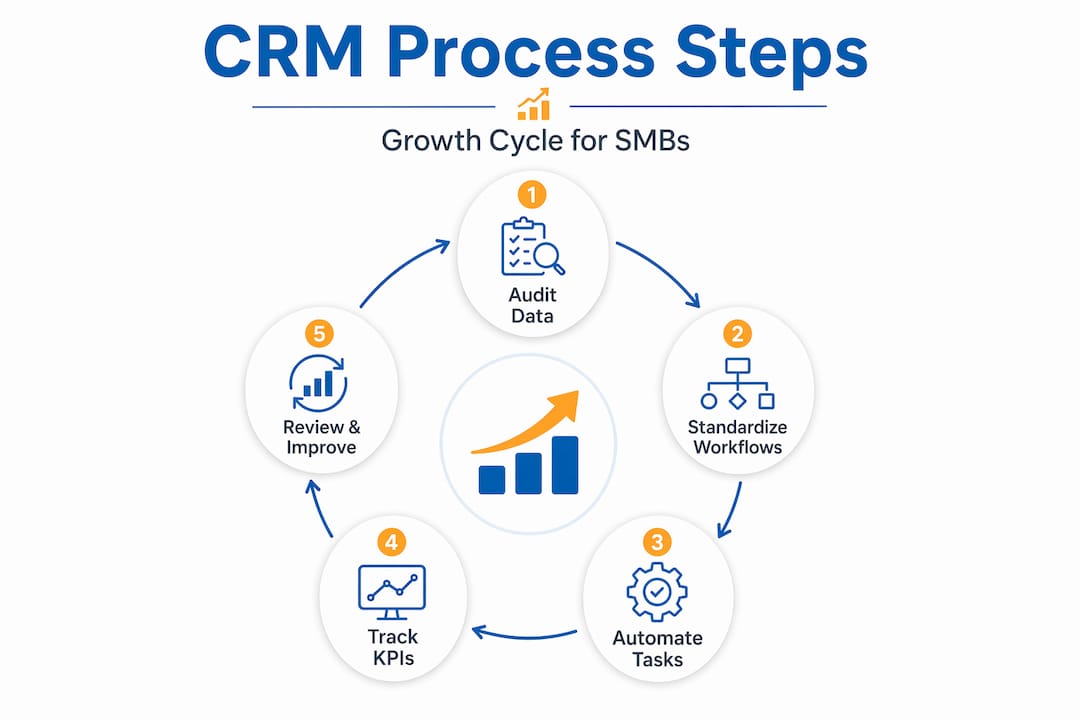
The key is choosing KPIs that align with what your business cares about most at each stage of growth. Group them into four categories:
| KPI category | Example metrics | Review cadence |
|---|---|---|
| Sales performance | Conversion rate, deal cycle length, closed revenue | Weekly |
| Marketing effectiveness | Lead volume, email open rates, cost per lead | Monthly |
| Service and experience | Response time, resolution rate, satisfaction scores | Weekly |
| CRM adoption and data quality | Login rate, field completion, duplicate rate | Monthly |
Tracking CRM KPIs across adoption, sales, and service on a consistent schedule is what separates businesses that continuously improve from those that stagnate. Weekly reviews keep your team accountable on tactical metrics, while monthly reviews let you spot strategic patterns and make bigger decisions.
Use your essential marketing metrics alongside your CRM data to get a complete picture of where leads come from and how they convert. Then connect your CRM reviews to your efficiency through CRM and marketing integration so both sides of the business are working from the same data.
Tracking too many KPIs is as dangerous as tracking none. Pick five to seven metrics that directly reflect your current goals, review them consistently, and act on what you find. More metrics create noise. Fewer, focused metrics create clarity.
When you review your KPIs and spot a gap, treat that gap as the starting point for your next CRM improvement cycle. This is what makes CRM process improvement self-sustaining rather than reactive.
Schedule continuous CRM reviews and address automation health
With tracking in place, the final and ongoing step is making your CRM process resilient and proactive against issues. The biggest mistake most SMBs make is fixing their CRM once and assuming the work is done. Business conditions change, team members turn over, and automations silently break without anyone noticing.
Treating CRM as an ongoing program means building a regular review schedule into your operations. Here is what that should include:
- Monthly user reviews: Check login activity, task completion, and data entry consistency for all CRM users.
- Quarterly workflow audits: Walk through every active automation and workflow to confirm it still matches your current process.
- Quarterly data quality checks: Deduplicate contacts, verify lifecycle stages, and archive stale records.
- Bi-annual configuration reviews: Assess whether your pipeline stages, fields, and integrations still reflect your business model.
Even when automation exists, CRM processes can fail if data quality and broken automations are left unchecked. A workflow that silently breaks because a connected tool changed its API can result in weeks of missed follow-ups before anyone notices. Regular audits catch these issues early.
If you discover broken automations between scheduled reviews, fix them immediately and document what caused the failure. This creates a log you can use to prevent similar issues in the future. Do not wait for the next quarterly review if something is clearly wrong today.
Review CRM’s impact on sales growth data regularly to connect your operational efforts to real business outcomes. When you can show that better CRM health leads to higher conversion rates, it is much easier to keep your team committed to the process.
Pro Tip: Assign one person in your business as the CRM owner. This does not need to be a technical role. It simply means one person is responsible for monitoring CRM health, flagging issues, and scheduling reviews. Shared responsibility often means no responsibility, so make this role specific and visible.
The real secret: Process improvement is about how people use CRM, not just the software
Here is the perspective that most CRM guides will not tell you: buying more features or adding more automations rarely solves a failing CRM. The real problem is almost always a people and workflow problem, not a technology problem.
We have seen service businesses switch CRM platforms two or three times, each time hoping the new tool would solve everything. It almost never does. The same habits, the same unclear processes, and the same friction points follow them to the new system.
The smarter path is to understand why your team avoids the CRM. Is it too many required fields? Is the pipeline not matching how they actually sell? Is data entry duplicating work they are already doing in a spreadsheet? These are solvable problems that do not require buying anything new.
Newer best-practice guidance is very clear on this: adoption rises when CRM reduces user friction and automates routine tasks, rather than asking users to work around the system through mandates and training alone. Training has its place, but if your CRM adds friction, training only teaches people to tolerate a bad experience for a little longer.
The businesses that see lasting CRM improvement are those that appoint internal process owners, gather regular feedback from the people using the system daily, and make small iterative improvements on a consistent schedule. They treat the CRM as a tool that should serve their team, not a system their team should serve. That shift in perspective changes everything.
Take the next step: SMB-ready CRM and automation solutions
If you’re ready to act on these CRM improvement strategies, here’s how Go Online Now can help.
At Go Online Now-Connect, we built our platform specifically for service businesses that need a CRM and automation system that works without a dedicated IT team or a six-figure budget. Our marketingautomatiseringssoftware covers everything covered in this guide, from lead capture and automated follow-ups to pipeline tracking and data quality management, all in one place.
Whether you are starting from scratch or upgrading a broken CRM setup, our done-for-you onboarding team configures your automations, workflows, and pipelines at no extra cost. Want to understand how CRM works for SMBs before you commit? Explore our resources and see why hundreds of small service businesses trust Go Online Now-Connect to simplify their growth. No contracts, no hidden fees, and real human support every step of the way.
Frequently asked questions
What is the first step to improving CRM processes in a small business?
Start with a full audit of your CRM data, user activities, and current workflows to find gaps and inefficiencies. Auditing processes, users, and system configuration regularly is what creates a reliable foundation for every improvement that follows.
How often should CRM processes be reviewed?
Review your CRM processes, data, and automations at least quarterly, and more frequently if you make major workflow changes. Auditing data, lifecycle stages, and segmentation consistently ensures your strategy stays aligned with real business conditions.
Which CRM processes should be automated first?
Prioritize automating repetitive tasks like lead assignment, follow-ups, and standard intake scripts to quickly reduce manual work. Automating repetitive tasks and letting the CRM do the heavy lifting is the fastest path to better adoption and cleaner data.
How do I measure if CRM improvements are working?
Track KPIs around lead response times, sales conversions, user adoption rates, and data quality to measure progress clearly. Defining and tracking CRM KPIs on a consistent cadence helps you connect operational changes to real business outcomes.
Why do many CRM improvement projects fail?
They often fail because they focus on technology without addressing data quality and actual user workflow issues. CRM processes fail when broken automations and poor data quality are left unchecked, regardless of how advanced the software is.