

TL;DR:
- Most email campaigns fail due to poor planning rather than bad writing, emphasizing the importance of strategic setup.
- A thorough foundation, including goal-setting, tool selection, and legal compliance, is essential before crafting and launching campaigns.
Most email campaigns don’t fail because of bad writing. They fail because of bad planning. If you’ve ever sent an email blast and watched the open rates flatline, or worse, seen your unsubscribe numbers climb, the problem usually traces back to a skipped step somewhere before you hit send. This guide walks you through the complete email campaign step by step process, from setting your goals and building a compliant list to launching, monitoring, and improving your results. No fluff. Just a practical framework that works for small and mid-sized businesses in 2026.
Before you launch: the setup checklist
Before you write a single word of copy, you need a solid foundation. Skipping this stage is exactly why so many campaigns underperform. Think of it as doing the prep work before cooking. You wouldn’t start a recipe without knowing what dish you’re making.
Define your goal first
Every campaign needs one clear, measurable goal. Are you driving sales, re-engaging cold contacts, promoting a new service, or nurturing leads? Trying to do all four in one email is a fast track to low engagement. Pick one. Then choose a metric to measure it, whether that’s revenue generated, clicks on a specific link, or appointments booked.
Choose your tools
You need three things at minimum: an email marketing platform, a contacts database, and a basic content plan. The platform should support list segmentation, automation workflows, and performance reporting. Here’s a quick reference for what each tool category covers:
| Tool Type | Primary Function | Examples |
|---|---|---|
| Email Marketing Platform | Send, automate, and report | Platform of choice |
| CRM | Store and segment contacts | All-in-one CRM |
| Design Tool | Build templates | Canva, built-in editors |
| Analytics | Track conversions | Google Analytics, platform reports |
| Compliance Manager | Handle consent and opt-outs | Built into most platforms |
Pro Tip: Before you import your contact list, check that your email list growth practices are compliant. Contacts should have opted in clearly, and you should be able to prove it.
Get legal compliance right from day one
This is non-negotiable. CAN-SPAM requires a clear opt-out in every commercial email, and you must honor unsubscribe requests within 10 business days. For contacts in Europe, GDPR requires freely given, specific consent and immediate unsubscribe processing. Failing here doesn’t just expose you to legal risk. It damages your sender reputation, which directly affects how many people actually receive your emails.
Deliverability is the other foundational piece most small business owners overlook. Authentication records like SPF, DKIM, and DMARC protect your domain’s reputation and tell receiving mail servers that your emails are legitimate. Set these up before you send anything. Your platform or IT contact can walk you through the process.
Building your campaign from scratch
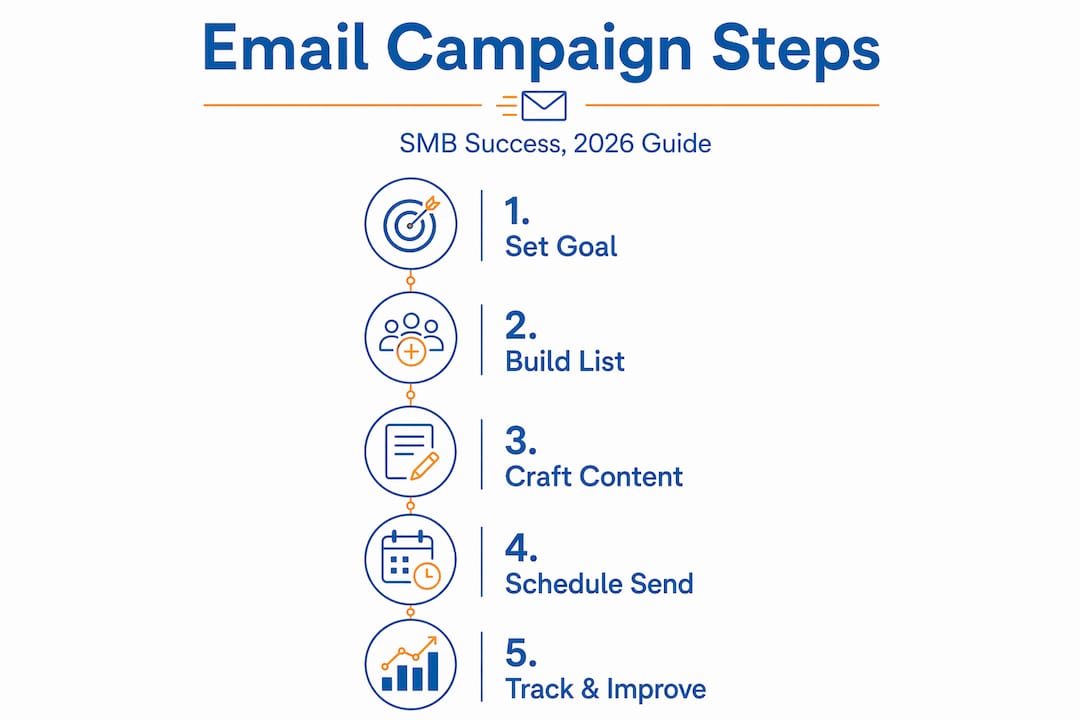
Now you’re ready for the hands-on work. The complete email campaign lifecycle covers goal definition, audience segmentation, copywriting, design, testing, scheduling, and monitoring. Here’s how to work through each step with intention.
-
Define a specific, measurable goal. “Get more sales” is not a goal. “Generate 15 appointments from our warm lead segment by the end of the month” is. Specificity drives every decision that follows, from your subject line to your call-to-action.
-
Segment and clean your list. Don’t send the same email to everyone. Divide your contacts by behavior, purchase history, location, or engagement level. Remove duplicates, hard bounces, and addresses that haven’t engaged in over 12 months. A smaller, cleaner list outperforms a large, messy one every time.
-
Write a subject line that earns the open. Your subject line is competing with dozens of others in a crowded inbox. Keep it under 50 characters, be specific about the value inside, and avoid spam trigger words like “Free!!!” or “Act now.” Test two versions against each other before sending to your full list.
-
Write body copy with one clear purpose. Every paragraph should move the reader toward the one action you want them to take. Use short sentences, active voice, and plain language. The importance of strong CTAs cannot be overstated. Make your call-to-action a button or bold link that stands out visually.
-
Design for mobile first. More than half of all emails are opened on a phone. Use a single-column layout, large fonts (at least 16px for body text), and buttons that are easy to tap. Most email platforms offer responsive templates that handle this automatically.
-
Add personalization with purpose. Using a contact’s first name is the floor, not the ceiling. Pull in data like their last purchase, location, or recent behavior to make the email feel relevant. This is where segmentation pays off directly.
-
Build your campaign calendar. Decide when you’re sending, how many emails are in the sequence, and what gap sits between each one. Consistency matters. Random sends erode trust and make engagement data harder to read.
-
Run pre-launch tests. Send test emails to team addresses across different devices and email clients. Check every link. Run A/B tests on subject lines with a smaller slice of your list before the main send.
Here’s a quick comparison of different segmentation approaches and what they work best for:
| Segmentation Type | Best Use Case | Expected Benefit |
|---|---|---|
| Demographic | Promotions tied to age or location | Relevant offers |
| Behavioral | Re-engagement or upsell campaigns | Higher click-through rates |
| Purchase History | Cross-sell and loyalty campaigns | Increased order value |
| Engagement Level | Win-back or list cleaning sequences | Better deliverability |
Pro Tip: Your SMB email marketing checklist should include a pre-send review of all links, mobile preview, and subject line character count. Make it a mandatory step, not an afterthought.
Launching and monitoring your campaign
Hitting send is the beginning, not the end. This is where most businesses check open rates once and move on. That’s a missed opportunity and a potential problem.

Pick the right send time
Send times matter, but there’s no universal answer. Test your own audience. Generally, Tuesday through Thursday mornings perform well for B2B audiences. If you serve consumers, evenings and weekends often outperform business hours. Your platform’s engagement data will show you when your specific list is most active.
Use automation to trigger smarter sends
Broadcast emails, where you send the same message to everyone at once, are the least efficient way to run email marketing. Lifecycle automations like welcome series, abandoned cart, and re-engagement generate more revenue per contact and work better with behavioral segmentation. If someone downloads a resource, they get a relevant follow-up sequence. If a customer hasn’t bought in 90 days, a re-engagement flow kicks in automatically. This is how you run an email campaign that works around the clock without manual effort.
Monitor the right metrics
Here’s what to watch during and after your launch:
- Complaint rate: Keep this under 0.10%, ideally below 0.05%, to protect your sender reputation.
- Click-through rate (CTR): Shows whether your content and CTA are resonating.
- Revenue per recipient: Divides total revenue by the number of people who received the email, giving you a true efficiency metric.
- Unsubscribe rate: A spike here signals a mismatch between your list and your content.
- Bounce rate: High bounces hurt deliverability. Clean bounced addresses promptly.
| Metric | Healthy Benchmark | What It Signals |
|---|---|---|
| Complaint Rate | Below 0.10% | Sender reputation health |
| Click-Through Rate | 2% to 5% | Content relevance |
| Unsubscribe Rate | Below 0.5% | List and content alignment |
| Hard Bounce Rate | Below 2% | List quality |
Pro Tip: One-click unsubscribes via List-Unsubscribe headers reduce spam complaints. Make it easy for people to leave. It protects your sender score and keeps your list healthy.
Handling unsubscribes properly goes beyond just removing an address. Suppression logic must prevent opted-out contacts from being accidentally reintroduced through list imports or CRM syncs. This is a common technical oversight that quietly destroys sender reputation over time.
Analyzing results and improving future campaigns
One campaign teaches you something. Ten campaigns, analyzed properly, teach you everything you need.
Start with your key metrics from the launch. Then look at patterns across sends: which subject lines drove the most clicks, which segments converted, and which times of day produced the best engagement. This is your optimization roadmap.
A few practices that make each campaign better than the last:
- Document your A/B test results in a shared sheet. Keep a record of what variant won, by how much, and what you changed. Most teams run tests but never build on the findings.
- Track inbox placement, not just open rates. Relying solely on open rates is outdated because Apple’s Mail Privacy Protection inflates them artificially. Focus on clicks, conversions, and complaint rates for a more accurate read.
- Review your sender reputation monthly. Tools like Google Postmaster or your platform’s deliverability dashboard show you whether your domain is healthy. Address drops quickly.
- Plan your next segmentation update. As your list grows, the segments that worked six months ago may need refinement. Add new behavioral triggers or purchase-based criteria regularly.
Pro Tip: AI tools can help with send-time optimization and subject line testing, but always have a human review the final content for tone and accuracy before it goes to your list.
The most successful brands follow core email marketing steps in the right order, especially nailing deliverability first. If your campaigns are underperforming, start by auditing your deliverability setup before tweaking your copy.
My honest take on what actually works
I’ve reviewed and helped build a lot of email campaigns for SMBs, and the pattern is consistent. The businesses that see real results aren’t sending more emails. They’re sending smarter ones, backed by clean lists, solid deliverability infrastructure, and behavior-triggered automations.
The mistake I see most often is treating deliverability as a technical afterthought. Business owners invest hours in design and copywriting, then send everything from an unverified domain with no DMARC record. The email never reaches the inbox. All that effort goes unseen. Getting your authentication records in place and maintaining a healthy complaint rate protects every piece of content you create.
The other thing I’ve learned: broadcast campaigns have their place, but journey-based automations triggered by customer behavior consistently outperform them for revenue. A welcome series that sends based on what someone actually clicked tells a far more relevant story than a monthly newsletter that goes to everyone at once.
Clean your list before every major campaign, manage your unsubscribes with a proper suppression system, and measure what actually matters. Frequency is not a strategy. Relevance is.
— Go
Ready to put this into practice?
Walking through an email campaign step by step is one thing. Having the right tools to execute it automatically is another. Goonlinenow was built specifically for SMBs that want to run professional email campaigns without needing a dedicated marketing team or an expensive, overengineered platform.
With Goonlinenow, you get email automation, list segmentation, behavioral triggers, and CRM in one place, set up for you by a real human team at no extra cost. From your welcome series to your re-engagement flows, everything runs on a system designed to grow with your business. If you’re ready to see what marketing automation software for SMBs can do for your engagement and sales, explore what Goonlinenow offers. You can also check out the email marketing automation tutorial to see exactly how the setup process works.
FAQ
What is an email campaign step by step process?
An email campaign step by step process covers goal setting, audience segmentation, copywriting, mobile-first design, pre-launch testing, scheduling, and post-launch monitoring. Following this order gives each campaign the best chance of reaching the inbox and generating results.
How do I start email marketing for my small business?
Start by defining one clear goal, choosing a compliant email platform, and building a segmented list with proper consent in place. Then follow a structured campaign setup guide to write, design, test, and schedule your first email before moving to automation workflows.
What metrics should I track after sending an email campaign?
Track complaint rate (keep it below 0.10%), click-through rate, revenue per recipient, unsubscribe rate, and hard bounce rate. Open rates alone are unreliable in 2026 due to privacy tools that inflate them artificially.
How often should I send emails to my list?
There is no universal answer, but quality and relevance always outperform volume. Start with one to two emails per month, analyze engagement, and adjust frequency based on how your specific audience responds.
What is the difference between a broadcast email and an automated sequence?
A broadcast email goes to a segment of your list at a scheduled time. An automated sequence sends based on a contact’s behavior, such as signing up, clicking a link, or making a purchase. Automated sequences consistently produce higher engagement and revenue per contact.