
Many small businesses waste thousands each year juggling disconnected marketing tools that don’t talk to each other. The average SMB uses six to eight different platforms for email, CRM, analytics, and automation, creating data silos and hidden costs. All-in-one marketing platforms integrate core functions like email marketing, CRM, automation workflows, landing pages, and analytics into a single dashboard, reducing tool sprawl for SMBs. This guide explains what all-in-one marketing platforms offer, why they save time and money, when they work best, and how to choose the right solution for your business.
Key Takeaways
| Point | Details |
|---|---|
| Consolidates core tools | All in one platforms bring email, CRM, automation, landing pages, and analytics into a single dashboard to reduce tool sprawl for SMBs. |
| Cost and time savings | Replacing multiple subscriptions with a single platform lowers monthly costs and frees time for strategic work. |
| Quick ROI for SMBs | For many SMBs rapid payback is achieved as integration reduces manual tasks and accelerates revenue opportunities. |
| Enterprise limitations | The guide notes that very large enterprises with complex needs may see limited benefits from all in one marketing platforms. |
| Hybrid strategy option | A hybrid strategy blends all in one platforms with best of breed tools to tailor capabilities to specific requirements. |
What is all-in-one marketing? Understanding the core functions
All-in-one marketing platforms bring together essential marketing and sales tools into a unified system. Instead of logging into separate accounts for email campaigns, contact management, landing pages, and reporting, you work from one dashboard. This integration solves a critical problem for SMBs: scattered data and wasted hours switching between platforms.
These platforms typically include five core functions. Email marketing lets you create campaigns, segment audiences, and track opens and clicks. CRM functionality stores contact details, tracks interactions, and manages your sales pipeline. Marketing automation builds workflows that nurture leads without manual effort. Landing page builders let you create conversion-focused pages without coding. Analytics dashboards show real-time performance across all channels.

The real power comes from how these features connect. When a prospect fills out a form on your landing page, they automatically enter your CRM. You can trigger an email sequence based on their behavior. If they click a specific link, your automation can assign them to a sales rep. This seamless data flow eliminates the manual export-import cycles that plague businesses using separate tools.
For resource-strapped SMBs, this integration addresses three pain points. First, you eliminate redundant data entry across systems. Second, you reduce the learning curve since your team masters one interface instead of five. Third, you gain a complete view of each customer’s journey without stitching together reports from different sources. Our complete guide to marketing automation software explores how automation specifically transforms SMB operations.
Core features you should expect:
- Email campaign builder with templates and A/B testing
- Contact database with custom fields and segmentation
- Visual workflow builder for automation sequences
- Drag-and-drop landing page creator
- Unified analytics showing campaign performance
- Integration options for payment processors and calendars
The goal is operational simplicity. You spend less time managing technology and more time growing your business. For SMBs competing against larger companies, this efficiency gain levels the playing field.
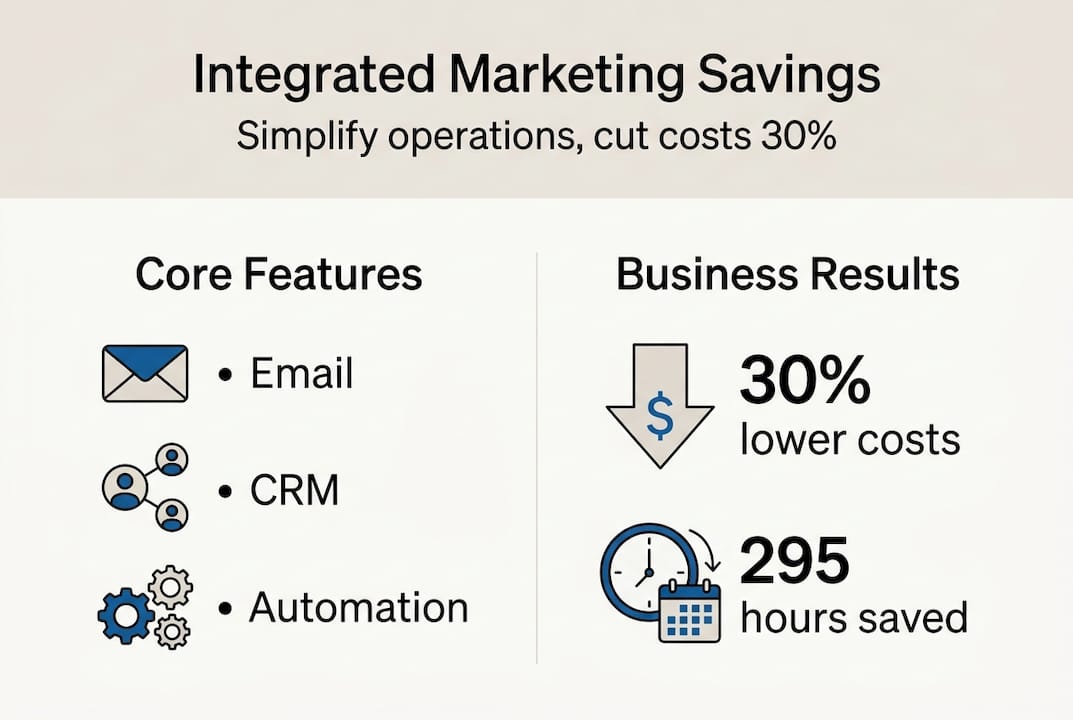
Benefits of all-in-one marketing platforms for SMBs: saving cost and boosting efficiency
The financial case for consolidation is compelling. Empirical benchmarks show agencies cut SaaS costs by 30%, gain 22% productivity, and SMBs save hundreds of hours with platforms like HubSpot and ActiveCampaign generating impressive ROI. When you replace five subscriptions with one, the math is straightforward. A typical SMB paying $50 to $150 per month for each tool can reduce monthly software costs from $400 to $150 or less.
Time savings multiply these financial benefits. HubSpot users report saving 295 hours annually by eliminating manual tasks and data transfers. That’s nearly two months of work recovered for strategic activities. ActiveCampaign data shows 42% of SMBs achieve positive ROI within 90 days of implementation. This rapid payback period makes all-in-one platforms accessible even for businesses with tight budgets.
Productivity gains extend beyond hours saved. When your marketing and sales teams work from the same system, collaboration improves. Sales reps see which emails a prospect opened. Marketers track which campaigns generate qualified leads. This visibility reduces friction and speeds up decision making. Studies document 22% productivity increases when teams adopt integrated platforms.
AI-powered automation within these platforms drives additional value. Intelligent lead scoring identifies your hottest prospects automatically. Predictive send-time optimization ensures emails land when recipients are most likely to engage. These features can reduce customer acquisition cost by 30% by focusing resources on high-value opportunities. Check out our analysis of proven ROI marketing automation software for detailed case studies.
The efficiency benefits compound over time:
- Faster campaign launches since assets live in one place
- Reduced errors from manual data transfers
- Quicker onboarding for new team members
- Simplified vendor management and billing
- Better data quality with single source of truth
Key statistic: Businesses using all-in-one marketing platforms report 30% lower SaaS costs and save an average of 295 hours per year compared to managing multiple disconnected tools.
For SMBs evaluating whether to consolidate, these metrics provide clear benchmarks. The investment pays for itself through direct cost savings and recovered time. Our guide to marketing automation benefits for SMEs explores additional strategic advantages.
Limitations and expert nuances: when all-in-one may not be enough
All-in-one platforms excel for many SMBs, but they’re not universal solutions. All-in-one platforms are less ideal for large enterprises needing deep customization or complex B2B sales, risk vendor lock-in, and offer shallower specialized features. If your business requires advanced attribution modeling, sophisticated predictive analytics, or highly customized workflows, you may outgrow an all-in-one system.
Vendor lock-in presents a real risk. When your entire marketing operation runs on one platform, switching becomes complicated. Your email templates, automation workflows, landing pages, and historical data all live in that ecosystem. Migration to a different system requires significant time and technical expertise. This dependency can limit your negotiating power and flexibility.
Feature depth varies across all-in-one platforms. While they cover core functions well, specialized tools often provide more sophisticated capabilities. A dedicated email service might offer more advanced deliverability features. A purpose-built analytics platform could provide deeper insights. For businesses with specific technical requirements, these limitations matter.
Common automation mistakes include ignoring exceptions and lack of human oversight; hybrid stacks often provide optimal growth solutions. Many businesses set up workflows and forget them, leading to embarrassing errors. An automation might send the wrong email to a segment. A workflow could fail to account for edge cases like customers who buy multiple products. Without regular audits, these issues compound.
The hybrid approach offers a middle path. Use an all-in-one platform as your foundation for CRM, email, and basic automation. Then integrate specialized tools where you need advanced capabilities. This strategy provides core efficiency while preserving flexibility. You might connect a dedicated webinar platform or advanced SEO tool to your all-in-one system.
Common scenarios where all-in-one may fall short:
- Enterprise-scale businesses with complex multi-touch attribution needs
- Companies requiring custom API integrations with legacy systems
- Businesses needing advanced data science and predictive modeling
- Organizations with highly specialized compliance requirements
- Teams wanting cutting-edge features in specific marketing channels
Pro Tip: Schedule quarterly automation audits to test edge cases and verify workflows still match your business processes. Run test contacts through your sequences to catch errors before customers do.
Ons all-in-one CRM for SMBs resource explains how to evaluate whether integrated systems meet your specific requirements. The key is honest assessment of your complexity level and growth trajectory.
Choosing and implementing the right all-in-one marketing platform for your SMB
Selecting the right platform requires evaluating your specific needs against available options. SMBs should prioritize platforms with native CRM and marketing sync to avoid silos and test workflows before scaling. Start by mapping your essential workflows. Which processes consume the most time? Where do data handoffs create friction? These pain points guide your feature requirements.
Native integration between CRM and marketing functions is non-negotiable. Some platforms bolt together separate products, creating the same data silos you’re trying to escape. True all-in-one systems build CRM and marketing on shared databases. This architecture ensures contact records, interaction history, and campaign data stay synchronized automatically.
Cost structures vary significantly. Many platforms offer free tiers with basic features, perfect for testing fit before committing. As your contact list and feature needs grow, pricing scales accordingly. Calculate total cost of ownership including add-ons, additional users, and potential overage charges. Our affordable marketing automation software guide compares pricing models.
| Platform | Starting Price | Best For | Key Strength | Limitation |
|---|---|---|---|---|
| HubSpot | Free (paid from $45/mo) | Growing SMBs | Comprehensive free tier | Expensive at scale |
| ActiveCampaign | $29/mo | Automation-focused businesses | Advanced workflows | Steeper learning curve |
| Sender | Free (paid from $8.33/mo) | Budget-conscious startups | Affordable pricing | Limited advanced features |
| Keap | $249/mo | Service businesses | Strong CRM | Higher entry cost |
| Zoho | $14/mo | Multi-tool users | Broad ecosystem | Complex interface |
Implementation success follows a structured approach:
- Assess current workflows and identify integration requirements with existing tools
- Trial two to three platforms using free tiers or demos to test real workflows
- Migrate a small contact segment first to validate data mapping and quality
- Train your team with hands-on sessions focused on daily tasks they’ll perform
- Monitor key metrics for 90 days to measure impact on efficiency and results
Involve end users early in the selection process. The marketing coordinator who builds campaigns daily will spot usability issues executives miss. Run pilot campaigns through each platform to test the actual experience, not just feature lists. This hands-on evaluation reveals friction points before you commit.
Pro Tip: Create a scoring matrix with your must-have features weighted by importance. Rate each platform objectively to remove emotion from the decision. Include team members who will use the system daily in the evaluation.
Data migration deserves careful planning. Export contacts from existing systems and clean the data before import. Remove duplicates, standardize formatting, and verify email addresses. Poor data quality undermines even the best platform. Budget time for this foundational work.
Ons marketing automation complete SMB guide provides detailed implementation checklists and common pitfalls to avoid. The goal is smooth adoption that delivers value within the first 90 days.
Discover marketing automation that drives SMB growth
If you’re ready to simplify your marketing tech stack while boosting results, Go Online Now offers purpose-built solutions for growing SMBs. Our platform combines marketing automation, CRM, and proven strategies designed specifically for businesses like yours. We’ve helped SMBs achieve up to 85% more conversions and save 75% of their time within 90 days through integrated workflows and done-for-you setup.
Unlike complex enterprise platforms, we focus on what SMBs actually need: easy-to-use tools, transparent pricing, and real human support. Explore how our marketing automation boosting SMB conversions approach delivers measurable results. See the marketing automation proven ROI gains our clients achieve. Discover our complete marketing automation software driving SMB growth solution built for businesses ready to scale smarter.
Frequently asked questions
What is an all-in-one marketing platform?
An all-in-one marketing platform combines multiple marketing and sales functions into a single integrated system. These platforms typically include email marketing, CRM for contact management, marketing automation for workflows, landing page builders, and analytics dashboards. The key advantage is that all these tools share the same database, eliminating data silos and manual transfers between separate systems.
How do all-in-one platforms save time and money for SMBs?
Consolidation reduces subscription costs by replacing multiple tools with one platform, often cutting SaaS expenses by 30%. You eliminate redundant data entry and the time spent switching between systems, with users reporting savings of 295 hours annually. The learning curve shrinks since your team masters one interface instead of several. Automation features handle repetitive tasks like lead nurturing and follow-ups without manual effort, freeing your team for strategic work.
Are there any downsides to using an all-in-one marketing solution?
All-in-one platforms may lack the deep specialized features that dedicated tools provide for specific functions like advanced analytics or complex attribution modeling. Vendor lock-in becomes a concern since migrating your entire marketing operation to a different platform requires significant effort. Large enterprises with highly customized workflows or complex technical requirements often need hybrid approaches that combine all-in-one foundations with specialized best-of-breed tools for specific capabilities.
How can SMBs choose the best platform for their needs?
Start by testing platforms through free tiers or trials to evaluate how well they fit your actual workflows. Prioritize systems with native CRM and marketing integration to avoid data silos. Map your essential processes and identify which features matter most for your business. Consider your budget and growth trajectory, starting with affordable options that scale as your needs expand. Our affordable marketing automation software comparison helps you evaluate options based on your specific requirements and budget constraints.
Aanbevolen
- All in One Marketing Platforms Explained: Complete Guide – Go Online Now
- Why Affordable Marketing Tools Matter for SMBs – Go Online Now
- Affordable marketing software for SMB growth in 2026 – Go Online Now
- Affordable Marketing Solutions That Drive SMB Growth – Go Online Now
- Why Integrate CRM and Marketing for Insurance Agents